Module 4. Nodes, Relationships, and Properties in Practice
Course 4. Building Graphs in Neo4j
Estimated Time: 40–50 minutes
🧭 Module Objectives
- Create nodes and relationships using Cypher commands.
- Add properties (like names, dates, or roles) to nodes and relationships.
- Use MATCH to locate nodes and RETURN to visualize them.
- Understand how to structure small graphs that reflect meaningful relationships.
From Concepts to Creation
In earlier modules, we learned that:
- Nodes represent entities (people, songs, places, ideas).
- Relationships connect those entities.
- Properties describe their attributes.
Now, we'll actually build them—one piece at a time—inside your live Neo4j Aura instance.
Think of this as moving from a concept map on paper to an interactive, searchable version on your screen.
The Cypher Language
Neo4j uses its own query language called Cypher. It's designed to be human-readable, like drawing little ASCII art networks. Here's the basic pattern:(:Label {propertyKey: "propertyValue"})-[:RELATIONSHIP]->(:OtherLabel)
If you pay close attention, you can see that this syntax is specifically designed to mirror the way that this might appear in a graph diagram:

This pattern may be better understood through some examples from humanities contexts:

You'll notice:
- Parentheses
( )= nodes (a representation of the node circles in the visual graph) - Square brackets
[ ]= relationships (a representation of the visual graph's square-bracketed relationship types).- In the
(:Character {name: "Sauron"})—[:FORGED]—>(:Object {name: "The One Ring"})example, you may also notice square brackets used in the properties. In this case, these brackets indicate that these properties hold an array of multiple values. This is an especially useful feature for complex humanities data.
- In the
- Arrows
-->= direction of relationship (a representation of the visual graph's directional arrows) - Curly braces
{ }= properties stored as key/value pairs, applied to both nodes and relationships. - Colons before node labels and relationship types (e.g.,
:Person,:WROTE_SONG) = a clear indicator in Cypher syntax letting the the system know that the next word is a node label or relationship type and not a variable.
Creating Your First Nodes
Let's start simple. We'll begin by clearing our database of any nodes or relationships that we might have created earlier. Enter the following command into your Cypher Editor and run it (click the Run icon or use a keyboard shortcut):
MATCH (n) DETACH DELETE n;
This finds all the nodes in your database, detaches them from any incoming or outgoing relationships, and deletes all nodes and relationships. Be careful with this command in the future, as it will do the same thing anytime it is run, wiping out your entire database!
Now, let's create some new nodes and relationships. Copy and paste these commands into the Aura Console's Cypher Editor, running each command separately.
-
CREATE (p:Person {name: "Jesse Wells", birthYear: 1992, hometown: "Ozark, Arkansas"}) -
CREATE (s:Song {title: "War Isn't Murder", year: 2024}) -
CREATE (t:Theme {name: "Protest", description: "Songs addressing social or political issues"})
You may notice that unlike previous commands that we've run, we're not seeing much in the Results Stream, except for a brief message like "Created 1 node, set 2 properties, added 1 label." This is because we haven't commanded the database to RETURN anything. We'll do that now to check our work: MATCH (n) RETURN n;
🎉 Now, you should see three colorful circles in your graph: each one a node. Try clicking them to view their properties in the right-hand panel. Toggle between the "graph," "table," and "RAW" views to see the differences between them.
You may have noticed that we used the "Wells" spelling for Jesse's last name. This is by design: here, we are recording the person Jesse Wells, using his legal name. Later, we'll connect him to his artist persona: "Jesse Welles," which will be represented by an Artist node. This may seem a bit confusing, but this kind of thing is very common in the humanities and arts, where individuals use stage-names, pen-names, etc. For example, the famous American writer "Mark Twain" was actually named Samuel Clemens. More recently, Pope Leo XIV was born Robert Francis Prevost and only became "Leo" upon his papal ascension.
Creating Relationships
Next, let’s connect our nodes. We'll use Cypher's MATCH command to locate our nodes and CREATE to define relationships between them:MATCH (p:Person {name:"Jesse Wells"}), (s:Song {title:"War Isn't Murder"})
CREATE (p)-[:WROTE_SONG]->(s);
And one more:MATCH (s:Song {title:"War Isn't Murder"}), (t:Theme {name:"Protest"})
CREATE (s)-[:EVOKES]->(t);
Now return everything again:MATCH (n)-[r]-(m)
RETURN n, r, m;
You should now see a connected graph: a person, a song, and a theme linked by two arrows.
The MATCH command asks the database to find all nodes and relationships that match the pattern we give it. So in our first CREATE command, we were able to create the WROTE_SONG relationship only between the Person "Jesse Wells" and the song "War Isn't Murder." Similarly, our second CREATE command created the EVOKES relationship between the song "War Isn't Murder" and the" Protest" Theme.
Adding Properties to Relationships
Relationships can also carry their own metadata. For example, to record when the song was written, we would use the following command:MATCH (p:Person {name:"Jesse Wells"})-[r:WROTE_SONG]->(s:Song {title:"War Isn't Murder"})
SET r.year = 2024;
To view that:MATCH (p)-[r]->(s)
RETURN p, r, s;
Click on the arrow in your graph visualization. You should see the property "year: 2024."
Relationships can have many properties: think of "roles," "dates," "locations," or "contexts."
Pay attention, again, to how we're using the MATCH command to limit the nodes and relationships that can be updated by our UPDATE command.
Adding More Nodes & Relationships
Let's expand our graph slightly to see the power of networks. You can either run these lines individually or as one whole block in the Cypher Editor:MATCH (p:Person {name:"Jesse Wells"})
MATCH (s1:Song {title: "War Isn't Murder"})
CREATE (art1:Artist {name:"Jeh-Sea Wells"})
CREATE (art2:Artist {name:"Dead Indian"})
CREATE (art3:Artist {name:"Cosmic American"})
CREATE (art4:Artist {name:"Welles"})
CREATE (art5:Artist {name:"Jesse Welles"})
CREATE (p)-[:PERFORMS_AS]->(art1)
CREATE (p)-[:MEMBER_OF]->(art2)
CREATE (p)-[:MEMBER_OF]->(art3)
CREATE (p)-[:MEMBER_OF]->(art4)
CREATE (p)-[:PERFORMS_AS]->(art5)
CREATE (alb1:Album {title:"Hells Wells", year:2024})
CREATE (alb2:Album {title:"Red Trees and White Trashes", year:2018})
CREATE (alb3:Album {title:"Middle", year:2025})
CREATE (art4)-[:RELEASED]->(alb2)
CREATE (art5)-[:RELEASED]->(alb1)
CREATE (art5)-[:RELEASED]->(alb3)
CREATE (s2:Song {title:"Seventeen"})
CREATE (s3:Song {title:"Horses"})
CREATE (p)-[:WROTE_SONG]->(s2)
CREATE (p)-[:WROTE_SONG]->(s3)
CREATE (s1)-[:RELEASED_ON]->(alb1)
CREATE (s2)-[:RELEASED_ON]->(alb2)
CREATE (s3)-[:RELEASED_ON]->(alb3);
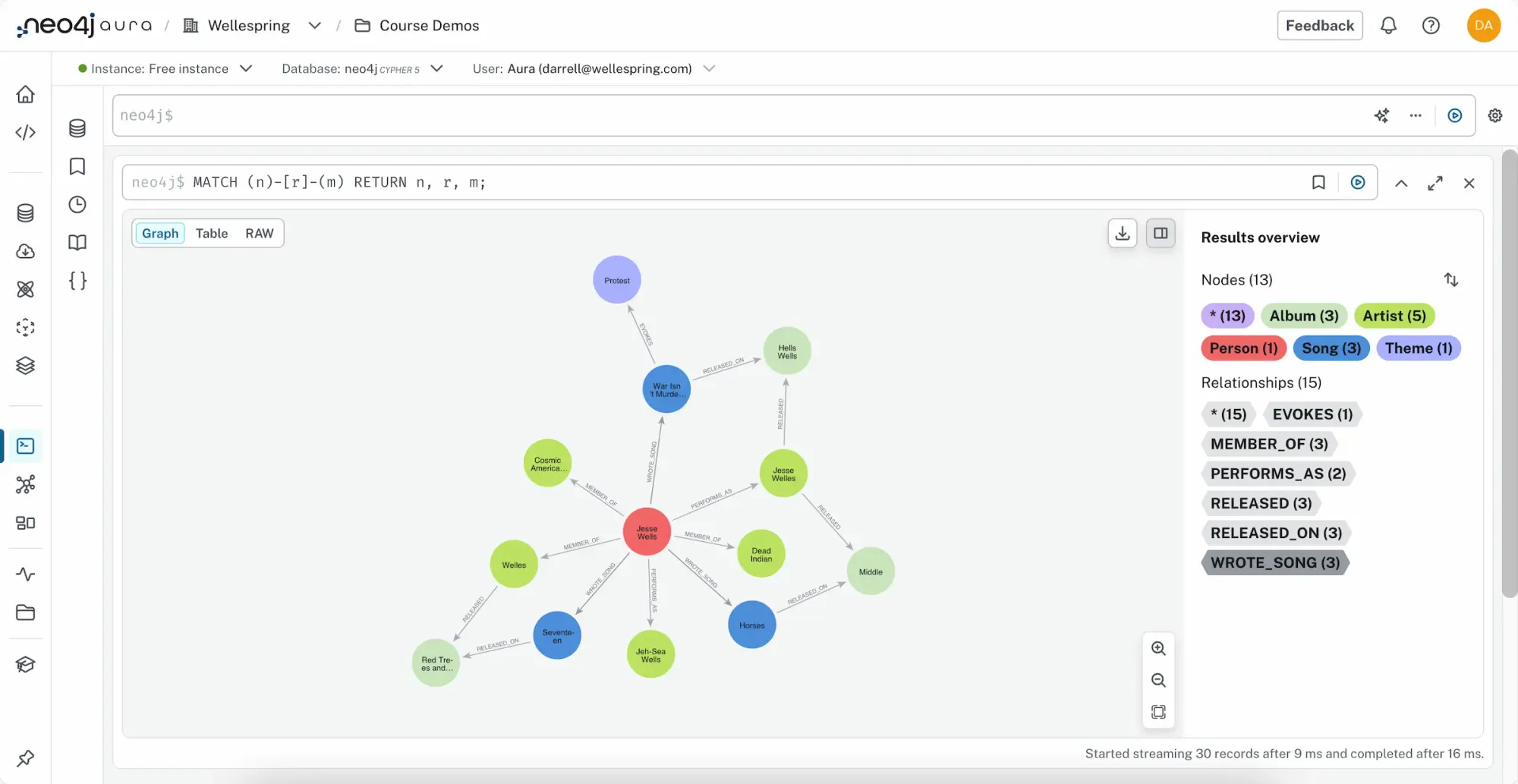
Then, return the graph to visualize it:MATCH (n)-[r]-(m)
RETURN n, r, m;
Your visualization now looks more like a web: a small but real Wellespring-style graph. Here is an example of what it might look like:
A Closer Look at Direction and Meaning
Relationships in Neo4j are directional (they have arrows), but the meaning is always context-specific.
| Example Relationship | Direction | Meaning |
|---|---|---|
(p)-[:WROTE_SONG]->(s) |
Outgoing | The person wrote the song. |
(s)-[:EVOKES]->(t) |
Outgoing | The song evokes a theme. |
(a)<-[:RELEASED_ON]-(s) |
Incoming | The song is released on the album. |
You can also query relationships regardless of direction using -- instead of -->:MATCH (p:Person)--(s:Song)
RETURN p.name, s.title;
Checking and Cleaning Your Data
Sometimes you'll want to see what labels or relationship types exist.
List all node labels:CALL db.labels();
List all relationship types:CALL db.relationshipTypes();
Delete all data (only if you want to start fresh!):MATCH (n) DETACH DELETE n;
⚠️ Use that last command ONLY when you intentionally want to CLEAR your database of ALL data!!
Key Takeaways
- Nodes represent entities (e.g., people, songs, places, ideas).
- Relationships connect nodes and can carry properties of their own.
- Properties give detail and meaning to your data.
- Cypher's syntax is designed to be intuitive: like sketching with text.
- Even a few nodes can reveal rich, interpretable patterns.
Knowledge Check & Reflection
Suggested Readings & Resources
- GraphAcademy "Cypher Fundamentals" course
- GraphAcademy "Graph Data Modeling Fundamentals" course
- Neo4j Aura Documentation
- Neo4j Cypher Cheat Sheet
- Merki Sasaki, Bryce, and Joy Chao. Graph Databases for Beginners. Neo4j, 2021.
- Robinson, Ian, Jim Webber, and Emil Eifrem. Graph Databases: New Opportunities for Connected Data. Second edition. O’Reilly Media, 2015.